






























Recent Searches

Comparing Top Call Captioning Apps

Mobile call captioning apps show live captions during phone calls. They help people with hearing loss read what callers say while they listen.

CaptionCall Mobile, InnoCaption, and Rylo (formerly Nagish) all provide phone call captions on compatible iPhone and Android devices. The right choice depends on whether you want a focused, no-frills call-captioning experience, additional accessibility tools, or the flexibility to get captions at home and on the go.

Quick answer: How do the apps compare?

  • CaptionCall Mobile is a strong choice for people who want straightforward, automatic call captions and the flexibility to add a professionally installed home caption phone if their needs change.
  • InnoCaption may be a good fit for people who want to choose between automated captions and captions provided by a live stenographer.
  • Rylo may be a good fit for people who want multilingual captions and text-to-speech.

CaptionCall is the only choice here that offers both a mobile call captioning app and a home caption phone. Eligible users can choose mobile, home, or both through one provider.

How we compared these apps

CaptionCall prepared this comparison using publicly available provider information reviewed in August 2026.

We compared:

  • Device compatibility
  • Captioning method
  • Phone-number setup
  • Accessibility features
  • Customer support
  • Home caption-phone availability

Internet connection, background noise, speaker clarity, accents, and other calling conditions may impact caption performance on all services. Caption speed and accuracy were not independently tested for this comparison.

What is the best call captioning app for you?

The best call captioning app for you depends on how you communicate and which features you will actually use.

Some people want a focused app that makes phone conversations easier to follow. Others want additional tools such as text-to-speech, multilingual captions, browser caption viewing, or in-person transcription.

When comparing phone caption apps, consider:

  • Whether the app works with your smartphone
  • Whether captions are automatic or provided by a live stenographer
  • How you will receive incoming calls
  • Whether you need text-to-speech or multilingual captions
  • How comfortable you are managing app settings
  • Whether customer support is available
  • Whether you might also benefit from a home caption phone

More features do not automatically create a better experience. The right app is the one that provides the help you need without making phone calls more complicated.

CaptionCall Mobile

CaptionCall Mobile provides automatic, real-time captions for incoming and outgoing calls on compatible iPhone, iPad, and Android devices.

Calls connect directly between the two people, and captions are generated without a third person listening.

Key features

  • Automatic real-time captions
  • Incoming and outgoing captioned calls
  • Captioned voicemail
  • Saved call captions
  • Adjustable text and display settings
  • Compatibility with Bluetooth hearing aids, AirPods, and headphones
  • Call-forwarding and caller-ID options
  • Access to customer support

Why choose CaptionCall Mobile?

CaptionCall Mobile focuses on one primary job: making phone conversations easier to follow.

It may be a strong fit if you want automatic call captions without navigating features you do not need. CaptionCall can also provide home phone captioning if a traditional phone becomes more comfortable. Eligible users can get both from one company rather than finding a different provider.

InnoCaption

InnoCaption provides phone call captions on compatible iPhone and Android devices.

Its main difference is that you can choose between automatic speech-to-text captions and live stenographer captions. Users can switch captioning methods before or during a call.

Key features1

  • Automated or live-stenographer captions
  • Incoming and outgoing captioned calls
  • Text-to-speech
  • Captioned voicemail
  • Saved transcripts
  • One Number call forwarding
  • Browser caption viewing through InnoCaption Web2

InnoCaption may be a good fit for people who want more control over their captions. It works well for those who are comfortable managing extra features and settings.

Rylo (formerly Nagish)

Rylo is the new name for the service previously known as Nagish.4 Older app references and search results may still use the Nagish name.

Rylo uses AI-powered speech recognition to provide captions for incoming and outgoing phone calls. It also offers accessibility tools for communication beyond phone calls.

Key features3

  • AI-powered call captions
  • Text-to-speech
  • Captioned voicemail
  • Saved transcripts
  • Support for more than 50 languages
  • Hearing-aid and Bluetooth compatibility
  • Adjustable caption appearance

Rylo may be a good choice if you need multilingual captions. It may also work well if you need more communication tools on your mobile device.

The CaptionCall difference: One provider for home and mobile

CaptionCall Mobile is not limited to a standalone app experience.

Eligible users can choose:

  • CaptionCall Mobile for calls on the go
  • A large-screen CaptionCall phone for calls at home
  • Both options for greater flexibility

This can be especially helpful for people whose comfort with technology or communication needs change over time.

It can also help families who find that a loved one feels more at ease using a familiar home phone.

CaptionCall’s Red Carpet Service for the home phone includes:

  • Phone delivery
  • Professional installation
  • Personalized training
  • Help making a first captioned call
  • Time for questions

The Red Carpet Service applies to the CaptionCall home phone. CaptionCall Mobile users can also contact CaptionCall for app support.

Are call captioning apps available at no cost?

CaptionCall Mobile, InnoCaption, and Rylo are no-cost for eligible people in the United States. To be eligible, your hearing loss must make captions necessary to use the phone.

How are they no-cost? All three services are part of the Internet Protocol Captioned Telephone Service (IPCTS) and receive their funding through the Interstate Telecommunications Relay Service (TRS) Fund. The FCC administers this fund. Financing comes from fees on telecommunications carriers and similar service providers.

Users may still be responsible for their smartphone, cellular service, mobile data, internet service, and carrier charges.

Frequently asked questions

What is the best call captioning app

The best app depends on the user’s smartphone and communication needs. CaptionCall Mobile provides focused automatic call captions with straightforward and user-friendly controls. InnoCaption offers automated and live-stenographer options. Rylo offers multilingual captions and text-to-speech.

What is the easiest call captioning app for seniors?

Ease of use depends on the user’s comfort with smartphones, call forwarding, and app settings. A focused app may be preferable for someone who only wants phone call captions.

Alternatively, someone who is uncomfortable with smartphone apps may prefer a professionally installed home caption phone.

Do these call captioning apps work on iPhone and Android?

Yes. CaptionCall Mobile, InnoCaption, and Rylo are available for compatible iPhone and Android devices. Operating system requirements vary.

Can I keep my existing phone number?

CaptionCall Mobile, InnoCaption, and Rylo offer a similar setup experience. Users receive a new phone number but can continue using their existing number through options such as call forwarding or caller ID linking, allowing incoming calls to reach the app while maintaining continuity with contacts.

Are call captioning apps private?

Privacy depends on the selected provider and captioning method. CaptionCall Mobile uses automatic captions without a third person listening. InnoCaption allows users to choose automatic captions or a live stenographer. Rylo uses AI-powered captions without a human operator.

Can I use a mobile captioning app and a home caption phone?

Yes. Eligible users can use CaptionCall Mobile and a CaptionCall home phone. CaptionCall is the only provider in this comparison that currently offers both options.

Get phone captions at home and on the go

CaptionCall gives you more than one way to stay connected.

Use CaptionCall Mobile for automatic phone call captions on your smartphone. Choose a professionally installed CaptionCall phone for home or use both.

Publisher Disclosure

CaptionCall publishes this comparison and offers one of the services discussed on this page.

Competitor information is based on publicly available provider materials reviewed in August 2026. Features, availability, and requirements may change. Consumers should review each provider’s current information before making a decision.

Sources

  1. https://www.innocaption.com/
  2. https://www.innocaption.com/features
  3. https://rylo.com/
  4. https://rylo.com/post/nagish-is-now-rylo

CaptionCall, ClearCaptions, CapTel: What’s the Difference?

CaptionCall, ClearCaptions and Hamilton CapTel all offer captioned home phones that allow eligible users to access call captioning services. These phones display the other person’s words during calls.

Although their core purpose is similar, the services differ in phone design, connection requirements, installation, training, and ongoing support.

The best caption phone for hearing loss may not necessarily be the one with the longest feature list. Choose the one that fits your home, feels comfortable to use, and comes with the level of help you need to get started.

This comparison can help you choose the right option for yourself, a parent, or another family member.

Quick answer

CaptionCall, ClearCaptions, and Hamilton CapTel all provide captioned home phones that allow eligible users to access call captioning services. They all provide near real-time call captioning at no cost for people with hearing loss who need captions to use the phone effectively.

CaptionCall stands out for its scheduled Red Carpet delivery, installation, and personalized training. ClearCaptions emphasizes touchscreen features and its published lifetime warranty, while Hamilton CapTel offers the widest selection of phone models.

The best choice depends on your connection, accessibility, support needs, and which service you trust.

Compare captioned home phones at a glance

Feature/Service CaptionCall ClearCaptions Hamilton CapTel
No-cost captioning service Available to eligible users Available to eligible users Available to eligible users
Live captions Yes Yes Yes
Dedicated home phone Yes Yes Yes
Caption display Large, easy-to-read screen Large, full-color touchscreen Varies by model, including touchscreen and extra-large-display options
Connection High-speed internet, landline, or smartphone with a data plan, depending on setup Stable home internet required; designed to work with an existing home phone line Requirements vary by model; internet, phone service, or both may be needed
In-home service Red Carpet Service combines scheduled delivery, installation, training, and Q&A In-home or over-the-phone setup advertised On-site installation support where available
Self-installation help Virtual trainer available Over-the-phone help available Online and telephone help available
Saved call captions Yes Yes Available on supported models
Captioned voicemail Yes Yes Yes
Existing phone number Works with your existing home number Works with existing home phone service; configuration may vary Depends on the selected model and connection
Ongoing support U.S. based customer support via phone and email Support seven days a week and published lifetime warranty Phone and email support available 24/7; live-chat hours vary

This comparison is published by CaptionCall. It uses publicly available information from CaptionCall, ClearCaptions, and Hamilton CapTel as of August 2026.

No independent laboratory or head-to-head caption-accuracy testing was used. Product features, eligibility requirements, and service availability can change.

The CaptionCall Red Carpet Service difference

Captioning service can come with excellent features and still go unused if you don’t feel comfortable operating it.

That is why installation and training matter just as much as the captioning service itself.

Caption phone installation assistance varies among providers:

  • ClearCaptions advertises in-home or over-the-phone setup.
  • Hamilton CapTel offers online, telephone or on-site installation support, with on-site service available where offered.
  • CaptionCall’s Red Carpet Service combines delivery, installation, personalized training and questions into one scheduled experience.

With in-person Red Carpet Service, a CaptionCall trainer:

  • Delivers the caption phone to your home
  • Connects it to the appropriate service
  • Adjusts the captions, display, and sound level to your preferences
  • Explains the phone in clear, simple steps
  • Confirms the phone is connected and captions are functioning as expected
  • Shows you how to use important features
  • Answers your questions
  • Makes sure you feel comfortable before completing the appointment

If you prefer to install the phone yourself, you can connect with a virtual CaptionCall trainer for guidance.

Red Carpet Service is not simply delivery. Personalized onboarding helps you make the phone part of your everyday routine.

Choosing a caption phone service for a parent or family member

When choosing a caption phone for a parent, spouse, or other loved one with hearing loss, hardware specifications tell only part of the story.

Consider:

  • Can they comfortably read the caption display?
  • Who will set up the phone?
  • Will they need help adjusting the settings for their hearing and vision needs?
  • Will they receive patient, hands-on training?
  • Will they know whom to contact when they have questions?
  • Are they likely to continue using the phone after installation?

A home phone for hearing loss should make communication easier — not add another piece of technology to manage.

CaptionCall’s Red Carpet Service can ease that burden. We provide installation and training in your loved one’s home.

Phone and Caption Display

CaptionCall

The CaptionCall home phone provides a large, easy-to-read screen with real-time captions. It offers a familiar handset, speakerphone, contacts, and favorite numbers.

Eligible users can

  • Read captions during calls
  • Save captions to review later
  • Adjust volume and amplification, including speakerphone
  • Read captioned voicemail
  • Store frequently called contacts

ClearCaptions

The ClearCaptions Phone provides a large, full-color touchscreen. Published features include1

  • Adjustable caption size and color
  • Adjustable screen brightness and angle
  • Built-in speakerphone
  • Contacts and fast-dial favorites
  • Visual alerts for incoming calls
  • Call history with saved captions

Hamilton CapTel

Unlike the more streamlined home-phone options from CaptionCall and ClearCaptions, Hamilton offers several models. These phones support different connection types and accessibility needs.

Options include2

  • CapTel 2400i with a large touchscreen
  • CapTel 840i with traditional buttons
  • CapTel 880i with an extra-large display for people with low vision
  • CapTel 840PLUS for customers without high-speed internet

Features vary by model. Multiple choices can be useful, but customers must determine which phone best matches their connection and accessibility needs.

Connection requirements

Your way of connecting to the internet and phone service may help decide which caption phone service is right for you.

CaptionCall

CaptionCall's home phone service is very flexible regarding connection requirements. Depending on your home setup, CaptionCall may be connected using:

  • High-speed internet
  • A landline
  • A smartphone with a data plan

A CaptionCall team member can help determine the appropriate connection before installation.

CaptionCall also offers a mobile app, which only requires a mobile or Wi-Fi signal.

ClearCaptions

ClearCaptions states that you need stable home internet. The ClearCaptions phone is designed to work with an existing home phone line and internet connection.1

Hamilton CapTel

Hamilton’s connection requirements vary by model:

  • The CapTel 2400i can use a phone line and internet or an internet-only configuration.2
  • The CapTel 840i and 880i generally use telephone service and high-speed internet.3, 4
  • The CapTel 840PLUS uses telephone service without requiring high-speed internet.2

Captioning and calling features

Feature CaptionCall ClearCaptions Hamilton CapTel
Real-time captions Yes Yes Yes
Saved captions Yes Yes Available on supported models
Captioned voicemail Yes Yes Yes
Speakerphone Yes Yes Yes
Contacts and favorites Yes Yes Varies by model
Adjustable volume Yes Yes Yes; up to 40 dB gain on certain models
Caption display adjustments Yes Yes Varies by model
Captioning method Uses voice-recognition technology and live captioning support, depending on the service Described as speech-to-text captioning Auto or Assisted options available on certain models

Caption performance can vary based on connection quality, background noise, speaker clarity, accents and other calling conditions.

Voicemail and saved call captions

All three providers offer ways to review information after a conversation.

CaptionCall

CaptionCall allows customers to:

  • Read captioned voicemail
  • Choose whether to save call captions after concluding each call
  • Review names, dates, addresses, and instructions

ClearCaptions

ClearCaptions provides:1

  • Captioned voicemail
  • A call log containing calls and captions

Hamilton CapTel

Hamilton CapTel models may include:2

  • A built-in answering machine
  • Captioned voicemail messages
  • Storage and deletion options vary by provider and phone model.

Can you keep your current number?

CaptionCall's home phone captioning service works with your current home phone number. Customers can also keep their existing home phone provider and calling plan.

ClearCaptions works with existing home phone service, although number configuration may depend on the selected setup.1

Whether you can keep your number with Hamilton CapTel depends on the phone model you choose. Some connect through existing telephone service, while others use an internet-based configuration.2

If retaining your current number is important, confirm the arrangement before selecting a captioning service provider.

Customer support

Even the most tech-savvy among us need assistance from time to time. When choosing technology for daily use, like a captioned phone, consider the customer service you can expect.

CaptionCall

CaptionCall provides:

  • U.S. based customer support specialists
  • Email and phone call assistance
  • Online manuals and videos
  • Printed manuals and guides
  • Additional phone training
  • A large, easy-to-read display
  • Flexible connection options between Wi-Fi, landline, or mobile data
  • Mobile captioning on iPhone or Android

Red Carpet Service also gives customers a personal starting point with a CaptionCall trainer.

ClearCaptions

ClearCaptions advertises:1

  • Phone and online-chat assistance
  • Continual customer support
  • A lifetime phone warranty

Hamilton CapTel

Hamilton provides:2

  • Online manuals and setup guides
  • Live chat during published hours
  • Telephone installation assistance

Eligibility and no-cost captioned telephone service

All three providers participate in the federally supported captioned telephone program.

Captioning service is available at no cost to anyone whose hearing loss makes captions necessary to use the phone. New users must register, verify their identity, and certify their need for captions.

Customers remain responsible for their existing internet, telephone, cellular, or other communication services.

Which captioned home phone service is right for you?

CaptionCall may be a better fit if you:

  • Want scheduled delivery and hands-on installation
  • Want personalized training and time to ask questions
  • Prefer a choice between Red Carpet Service and supported self-installation
  • Want help identifying the right connection for your home
  • Want to keep your existing home phone number
  • Want home and mobile captioning from the same provider
  • Want a large, easy-to-read display
  • Want flexible connection options between Wi-Fi, landline, or mobile data
  • Mobile captioning on iPhone or Android

ClearCaptions may be a better fit if you:

  • Have stable home internet
  • Prefer its touchscreen and visual-notification features
  • Want its published lifetime phone warranty
  • Are comfortable with in-home or over-the-phone setup

Hamilton CapTel may be a better fit if you:

  • Want to choose among several phone models
  • Need an extra-large display
  • Need a phone that does not require high-speed internet
  • Want the specific features available on certain Hamilton models
  • Are comfortable determining which model and installation support are available

How to get CaptionCall

1. Request your CaptionCall service and phone

Complete the online form or call CaptionCall.

2. Speak with the scheduling team

We will confirm your information, discuss your connection, and schedule your installation.

3. Receive Red Carpet Service

Your CaptionCall trainer will deliver and install the phone in your home. They'll also help you personalize its settings, show you how it works, and answer your questions.

You can also take call captioning on the go with the CaptionCall Mobile app.

Frequently asked questions

Which caption phone includes in-home installation?

CaptionCall offers scheduled Red Carpet Service that combines delivery, installation, personalized training and Q&A. ClearCaptions advertises in-home or over-the-phone setup.1 Hamilton CapTel offers on-site installation assistance where available, as well as online and telephone support.2

Can I keep my existing phone number?

CaptionCall states that its home phone works with your existing home phone number and service. Number arrangements for ClearCaptions1 and Hamilton CapTel2 can depend on the selected product and connection.

Which caption phone works without home internet?

CaptionCall can connect through a landline or smartphone with a data plan, depending on the customer’s setup. Hamilton’s CapTel 840PLUS works with telephone service without high-speed internet.2 ClearCaptions requires a stable internet connection.1

What is the easiest caption phone for an older parent?

The easiest option depends on the person’s vision, hearing, comfort with technology, and available connection. For someone who wants hands-on help, CaptionCall’s Red Carpet Service includes home installation, personalized settings and training.

Are captioned home phones available at no cost?

If you have hearing loss and need captions to use the phone, captioned phone service is available at no cost. Existing internet, landline or cellular charges remain the customer’s responsibility.

Do I need hearing aids to qualify?

No, you do not need hearing aids to qualify.

Can I use a home caption phone and a mobile captioning app?

Yes. CaptionCall offers both a dedicated home phone and CaptionCall Mobile for iPhone and Android. Eligible users can register for both services.

Start enjoying captioned calls at home

If you want a caption phone with personalized delivery, installation and training, CaptionCall may be the right fit for you.

Publisher disclosure

This comparison is published by CaptionCall, one of the services evaluated on this page. It is intended to help consumers understand meaningful differences among captioned home-phone options. Competitor information is based on publicly available provider materials as of August 2026. Information should be reviewed regularly for changes.

CaptionCall has no affiliation, sponsorship, partnership, or other arrangements with any companies referenced in comparisons made on this page.

Sources

  1. https://clearcaptions.com/how-it-works/home-phone/
  2. https://hamiltoncaptel.com/solutions/personal-solutions/captioned-telephones/
  3. https://www.captel.com/support/captel-840i/
  4. https://www.captel.com/support/captel-880i/

Captioned Home Phone vs. Mobile App: Which Is Right?

If hearing loss makes phone calls difficult, a caption phone for hearing loss or a mobile call captioning app can help you follow conversations more easily. Both solutions display real-time phone captions, so you can read what callers are saying while continuing to listen and speak naturally.

You can receive phone captions in two primary ways: on a dedicated captioned home phone or through a mobile captioning app on your smartphone.

The best option depends on where you make calls, the type of phone you prefer, and how comfortable you are using a mobile app. This guide can help you decide which solution best fits your daily life.

How phone call captioning works

During a captioned call, the other person’s words are converted into text and displayed on your screen in real time. You can listen, speak, and read the captions at the same time.

Captioned telephone service is available at no cost to eligible people in the United States whose hearing loss makes captions necessary to use the phone.

Eligible users must register to use call captioning. The service typically also requires an internet or mobile data connection.

How to get phone captions

Eligible users can get phone captions in two ways. They can use a special home phone with a caption screen. Or they can download a captioning app on a smartphone.

Caption phone for hearing loss

A caption phone for hearing loss is a dedicated telephone with a built-in screen that displays captions during calls

  • A home phone may be a good fit if you:
  • Make most of your calls at home
  • Prefer using a traditional telephone handset
  • Want a larger, dedicated caption screen
  • Would benefit from personalized setup or training
  • Do not want to rely on a smartphone for calls

Mobile call captioning apps

A mobile call captioning app displays phone call captions on a compatible smartphone during incoming and outgoing conversations.

A mobile app may be a good fit if you:

  • Primarily use a smartphone
  • Need captions when you are making calls away from home
  • Are comfortable downloading and using mobile apps
  • Travel or make calls from different locations
  • Prefer using one device for everyday communication

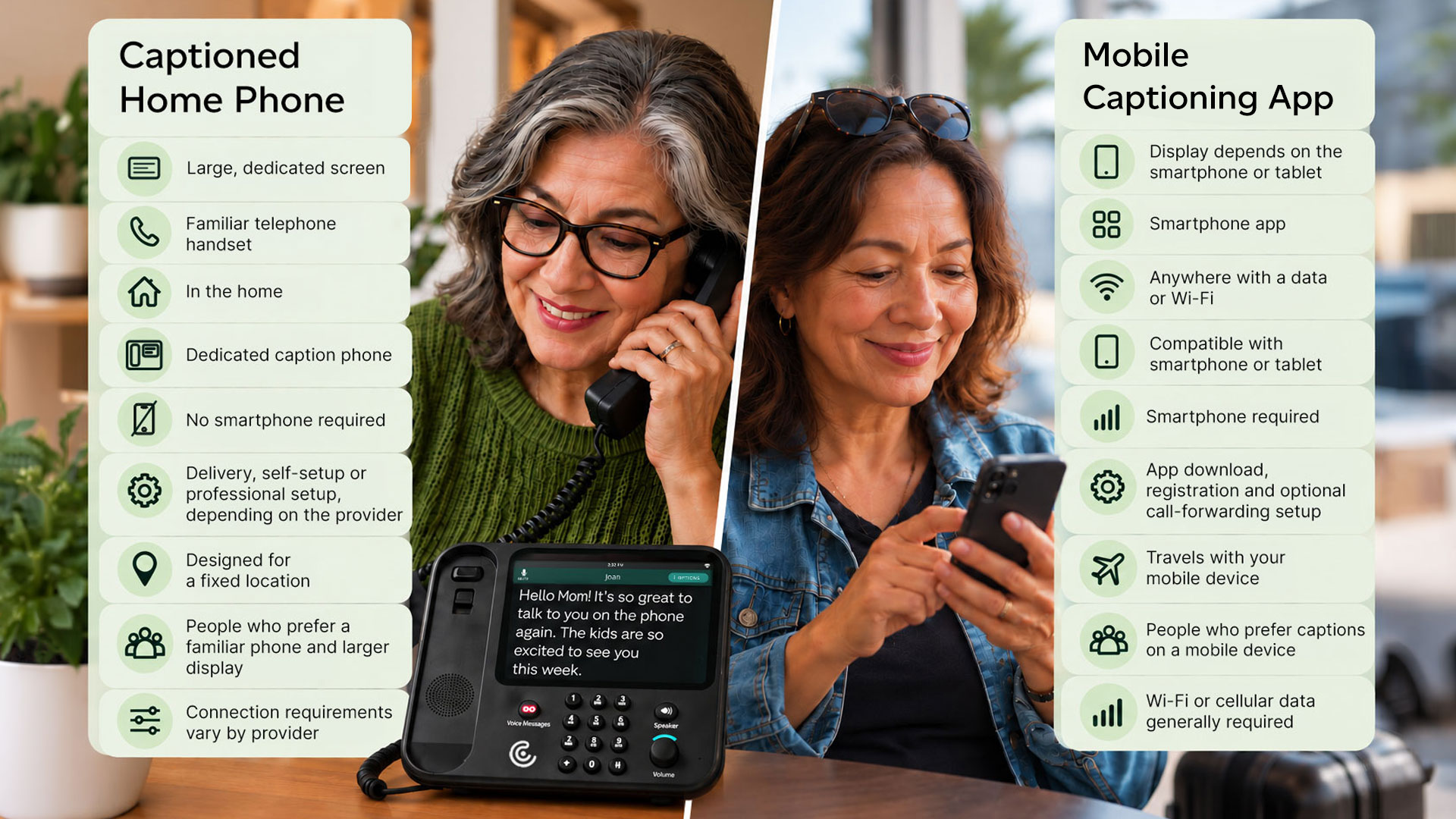
Quick comparison: Caption phone vs. app

If you're trying to choose the best caption phone for hearing loss or wondering whether a mobile captioning app would work better, this comparison can help.

How to choose the right captioning option for you

The right fit for a caption phone for hearing loss depends on how you prefer to make and take calls. People who primarily communicate from home often prefer a captioned home phone with a large display and familiar handset. People who rely on smartphones may prefer a mobile captioning app. Others choose a provider that offers both home and mobile options.

Consider these questions before choosing a service:

Where do you make most of your calls?

If most of your calls happen at home, a dedicated captioned phone may provide the most comfortable experience. If you regularly make calls while away from home, a mobile app offers greater portability.

How large do you want the captions to be?

If you prefer larger text, it’s worth considering screen size. A dedicated home caption phone generally provides a larger display.

Both home phones and mobile apps may allow you to adjust the text. However, your mobile device's smaller screen can limit the view and make large text captions hard to follow.

Which type of phone feels most familiar?

Some people prefer picking up a traditional handset and pressing physical buttons when they dial. Others are already comfortable using a smartphone for nearly every call.

Would you like help getting started?

Setup and support vary by provider. Some home-phone services include delivery, installation, and training.

Mobile apps generally require downloading the app, registering and completing setup on your device. Most apps include in-app instructions to help you get started.

Do you need both home and mobile captions?

You do not necessarily have to choose only one. Some providers offer both a dedicated home phone and a mobile captioning app.

Captioned telephone services and mobile captioning apps compared

Typically, when comparing this kind of service, price would be a major consideration. However, for eligible users, you can get call captioning from most providers at no cost. This is because a federally managed program provides the funding for these services.

One important difference is whether a provider offers a dedicated home phone, a mobile app or both. Popular captioned telephone service providers include CaptionCall, ClearCaptions, Hamilton CapTel, InnoCaption, and Rylo (formerly Nagish).

Provider Dedicated Home Phone Mobile App General Approach
CaptionCall Yes iOS and Android Home and mobile captioning options, including personalized home-phone setup
ClearCaptions Yes iOS only Primarily home-phone focused, with a mobile option for compatible Apple devices
InnoCaption No iOS and Android Mobile-focused service with automated and live-stenographer caption modes
Rylo, formerly Nagish No iOS and Android Mobile-focused service with AI call captions and additional communication tools

Competitor information is based on publicly available provider materials reviewed in August 2026. Features, compatibility, and service requirements can change. Review each provider’s current information before selecting a service.

Need captions at home and away?

Some people prefer the larger screen and familiar handset of a captioned home phone while they are at home—but still need mobile captions when they are traveling, running errands or attending appointments.

CaptionCall offers both options:

  • CaptionCall for Home provides a dedicated phone with a large caption screen, delivery, personalized setup and ongoing support.
  • CaptionCall Mobile brings real-time phone call captions to a compatible iPhone or Android smartphone.

You can choose the option that best matches your routine or explore both ways to stay connected.

Frequently asked questions

Are captioned home phones and mobile captioning apps available at no cost?

Captioned telephone services are available at no cost to eligible individuals whose hearing loss makes captions necessary to use the phone. Registration is required. Your existing phone, internet, or mobile data charges may still apply.

Do I need hearing aids to qualify for call captioning?

No. You do not need to wear hearing aids. Eligibility depends on whether your hearing loss makes captions necessary for effective phone communication.

Can I keep my current phone number?

The process varies by provider and product. Some services work with your existing number, while others use call forwarding or provide a separate phone number for the service.

Can I use both a home phone and a mobile captioning app?

Yes. If both options fit your communication needs, you may be able to use a dedicated captioned phone at home and a mobile app when you are away. Confirm availability and registration requirements with the captioning provider.

Which option is easiest for older adults? 

Age alone does not determine which option will be the easiest. People who prefer a traditional handset, larger screen, and personal setup may be more comfortable with a home phone. People who already use smartphones regularly may prefer a mobile app.

Which option provides the largest captions?

A dedicated home phone typically provides a larger physical caption display. Mobile caption size can be adjusted, and readability depends on the device and the app’s display settings.

Do captioned phone services require internet access?

Mobile captioning apps generally require Wi-Fi or cellular data. Home-phone connection requirements vary by provider and equipment.

What should I know about emergency calls?

Emergency-calling features and location requirements can differ between home phones and mobile apps. Review the provider’s current 911 or E911 information before using any captioning service for emergency calls.

Find the captioning solution that fits your life

The right solution is the one that makes phone conversations easier without making your daily routine more complicated.

Whether you prefer a large-screen home phone, captions on your smartphone or access to both, CaptionCall can help you stay connected with greater confidence.

Best Hard of Hearing Phone Features 2026

Finding the right phone can be challenging for those who are hard of hearing. Many phones lack the features needed for clear communication. Fortunately, there are phones designed with features specifically for hard of hearing users. This guide will explore the top phones features for hard of hearing users. We’ll highlight unique features, benefits, and considerations for choosing the right device. Whether you have hearing loss, or you care for someone who does, this article can help you find the best phone for your hearing loss needs.
Why phone calls are challenging with hearing loss

Even with hearing aids, many hard-of-hearing people still find phone calls particularly difficult to understand. Phone calls have several weaknesses that all contribute to this persistent challenge:
  • Lack of visual cues like body language or lip reading
  • Compression and signal limits audio quality
  • More impactful background noise interference
  • Hearing aids may not fully resolve clarity on calls
Phone calls are an important means of communication and connection, yet many people with hearing loss avoid them because of these challenges. Fortunately, solutions exist. Many people benefit from solutions designed specifically for phone hearing loss.

Understanding hard of hearing phones

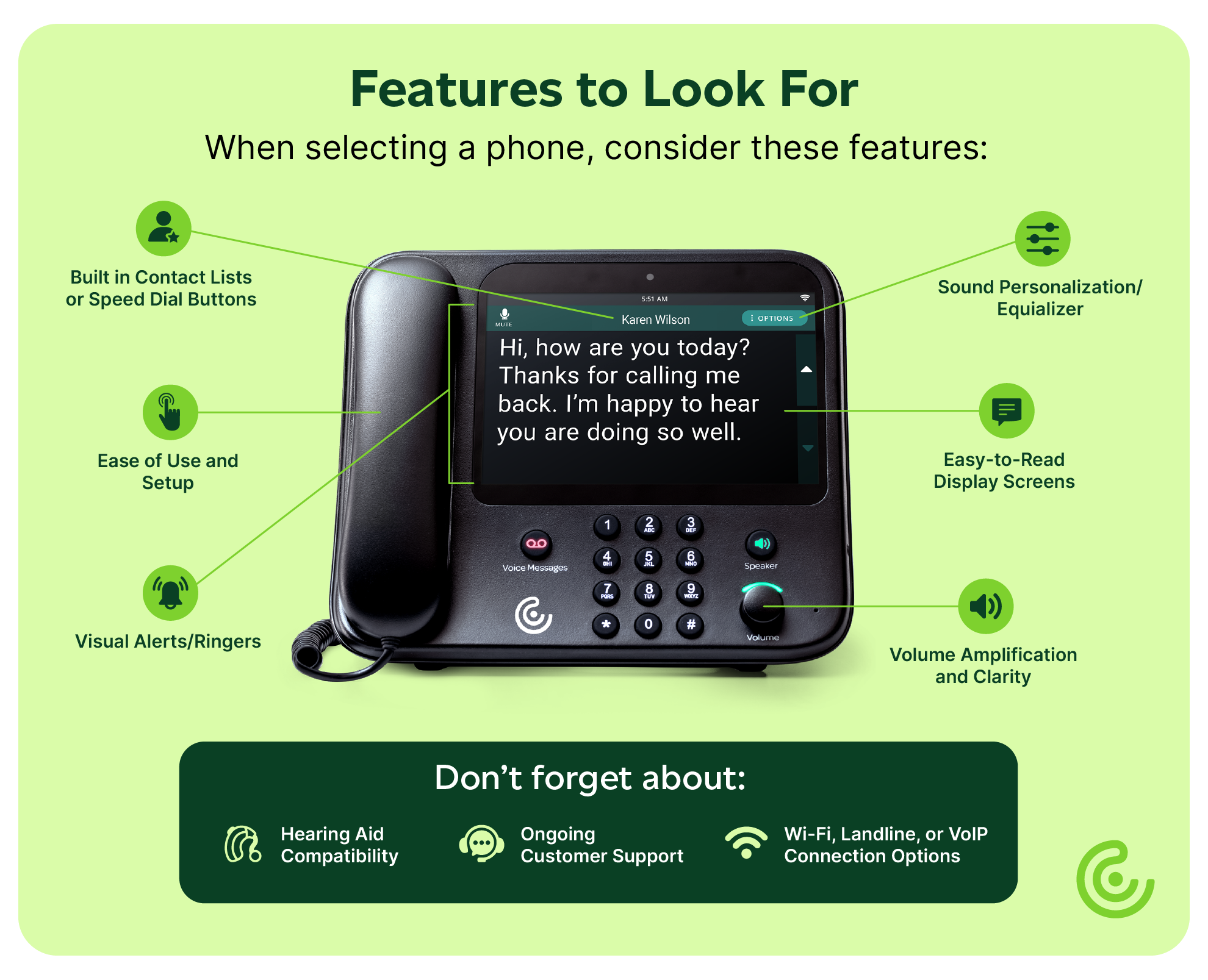
Phones for hard-of-hearing users enhance communication by addressing the challenges brought about by hearing loss. Amplified phones include options for increasing the volume of calls. This makes listening more manageable; however, amplification isn’t always the best solution for hearing loss. Hearing aid phones connect directly with hearing aids, typically through Bluetooth. This reduces errant noises your hearing aids may otherwise pick up for better sound clarity. Phones with captions show text of conversations as they’re happening on a large built-in screen. This adds a visual component to support users who have difficulty understanding spoken words on phone calls. Here are some essential features to look for:
  • Volume boost
  • Sound personalization/equalizer
  • Visual ringer
  • Easy-to-read display screens
  • Speed dial buttons or built in contacts lists
When choosing a hearing loss phone, consider which of these features will best fit your communication situation. Whether it’s amplification, customization, or visual cues, these phones cater to your individual needs.
Smartphone accessibility features and apps

For younger people with hearing loss or tech-savvy seniors, smartphone apps and features may be the best option. The biggest benefit is that you likely already own a smartphone, so it’s just a matter of finding the right features or apps. This means a convenient solution on a device you already use every day. Available built-in features vary by make and model phone, so you should check your phone’s user manual or search online for your specific phone. However, some common features include:
  • Bluetooth pairing with compatible hearing aids
  • Visual alerts and ringers
  • Real-time text (or RTT) allows you to type back and forth during calls
You can also find many third-party apps designed to help with hearing loss. Before downloading any app to your device, be sure to check out the reviews. Check out a list of our favorites here: Best Hearing App of 2025 | Apps for Hard of Hearing

Video Relay Service (VRS)

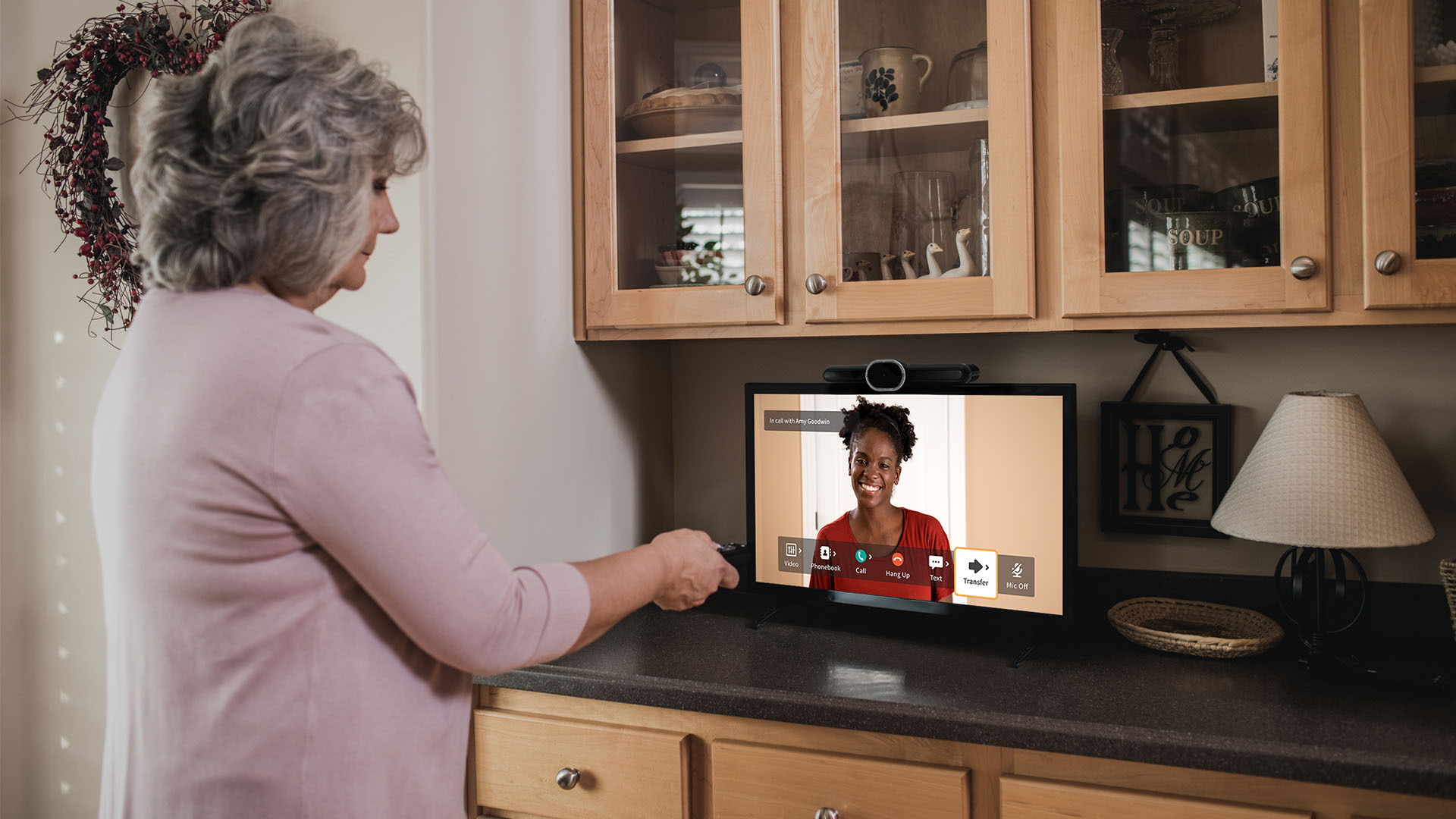
For people who use sign language to communicate, Video Relay Service may be the best phone option. This service works like a video call with a sign language interpreter. The interpreter helps ASL users and voice callers communicate. This option is best for Deaf individuals who communicate primarily using ASL. Learn more about Sorenson’s VRS service.
How to choose the right hard of hearing phone

Selecting the ideal phone for hard of hearing users starts with assessing individual hearing needs and daily communication styles. The first factor to think about is amplification needs. What decibel range do you begin to struggle with? Ask your audiologist whether your hearing loss centers around a specific sound frequency range. If you struggle with certain frequencies, choose a phone with audio settings that can adjust to them. It may fit you better than a phone that only boosts overall volume. Another important point to consider is compatibility with existing hearing aids. If you already use hearing aids, make sure to choose a phone that will work with them to provide the best audio quality. A final consideration is cost. If you have hearing loss that makes captions necessary to use the phone, you can get captioning service and a special captioning phone from CaptionCall at no cost.

Comparing Phone Hearing Loss Solutions

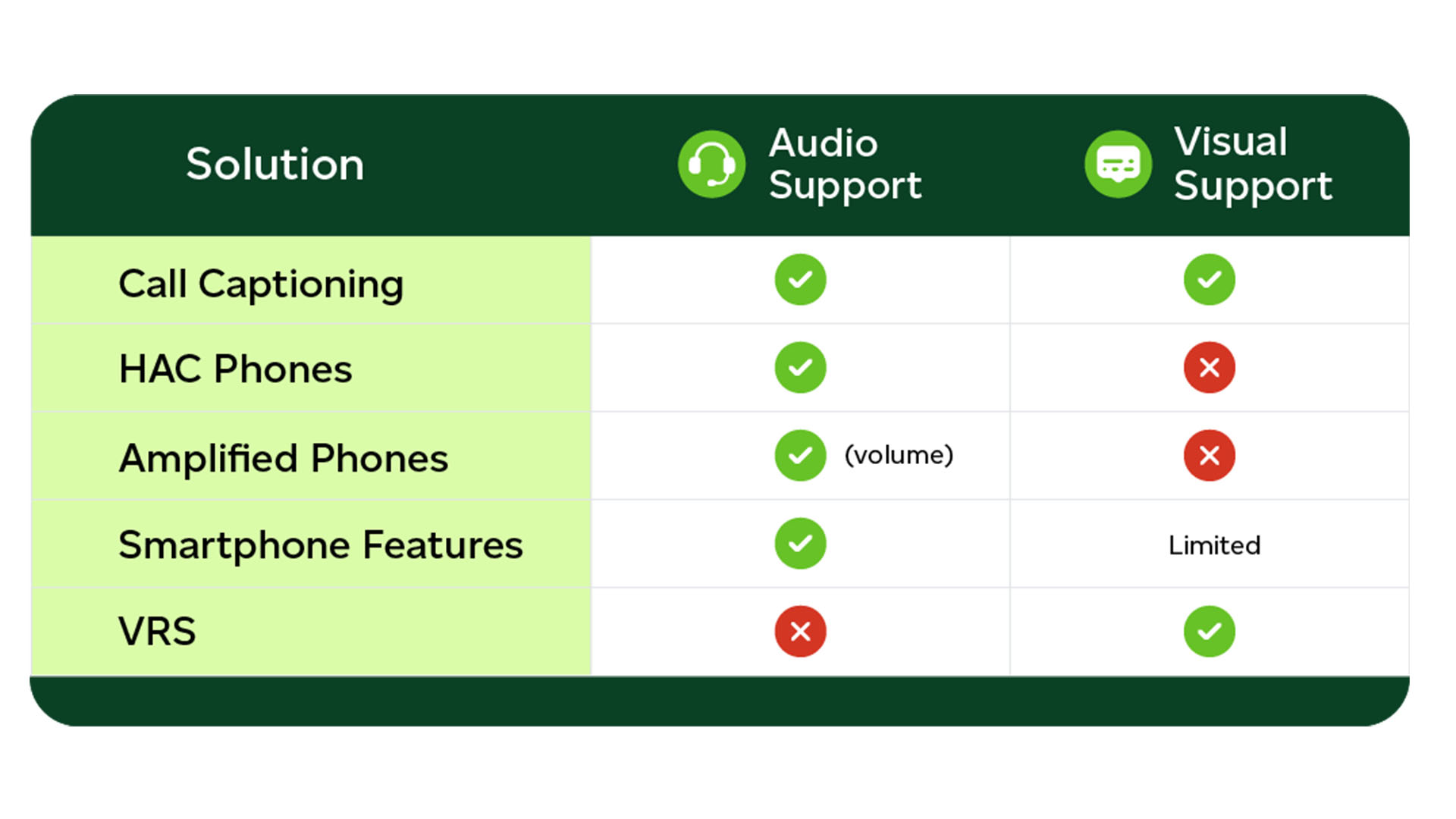
We all rely on more than just our ears when we’re listening, even if we don’t realize it. That’s phone calls can be such a persistent challenge with hearing loss. It’s also why many choose a hard-of-hearing phone option that include both audio and visual components. Call captioning combines audio and visual support, plus provides great flexibility as a mobile app. A good option for people who need both spoken audio and real-time captions during calls.

Tips for making phone calls easier

Whether you decide to get a specialized phone or not, there are a few quick steps you can take to make phone calls easier right now:
  • Make and take calls in a quiet area
  • Avoid multitasking during calls
  • Use active listening techniques to ensure you’re understanding correctly
  • Ask callers to speak clearly, repeat words, or rephrase themselves when necessary
  • Look into built-in accessibility settings on your existing phone

Conclusion: Finding the best phone for your needs

Phone calls provide vital connection to friends, family, doctors, and your community at large. If hearing loss makes phone calls hard or stressful, switching to a phone made for hearing loss may be worth it. Selecting the right hard-of-hearing phone is worth taking the time to consider your options and your needs. Whether you need sound amplification, customization, hearing aid compatibility, or visual features, choose what fits your needs. Interested in no-cost call captioning? Learn more about CaptionCall.

Call Captioning as Patient-Centered Audiology

What is patient-centered care?

Patient-centered care aims to treat each patient as a person with unique needs and experiences, rather than a collection of statistics. In audiology, patient-centered care means a comprehensive approach that considers the patient’s lived experience and real-world challenges that arise outside of the clinic.

Phone challenges

Phone calls can be particularly challenging, even with hearing aids, because they compound several problems:

  • No visual cues
  • Compressed audio
  • Accents and background noise
  • Automated systems

Additionally, many patients may not mention these struggles unless asked.

The audiologist's role

As an audiologist, you play an important role in helping patients address communication challenges both inside and outside the clinic. Discussing how patients manage phone conversations can help identify unmet needs and opportunities to support their overall communication experience.

How captioning fits in

Call captioning can help address common hearing challenges that phone calls present — background noise, audio compression, and a lack of visual cues. Captioned telephone services are available for individuals with hearing loss who need captions to use the phone effectively. For individuals who qualify, captioned telephone services may provide an additional tool to support communication over the phone. Captioned telephone solutions are designed to be familiar and easy to use for individuals who are comfortable with standard telephones. Asking your patients about their experiences with phone calls shows a patient-centered approach and helps ensure their needs are fully considered. For patients who qualify, CaptionCall may serve as a supplement to traditional hearing aids by:

  • Improve patient satisfaction
  • Increase their independence
  • Reinforce the success of traditional hearing aids.

A new age of “comprehensive care”

When taking a patient-centered approach, care doesn’t end at the clinic door. When evaluating patient needs, it is important to consider all communication environments — including phone calls. Interested in learning more about call captioning? Learn more about becoming a CaptionCall provider.

Call Captioning: A Key Part of Patient-Centered Audiology

Across disciplines, there’s been a notable rise in a patient-centered approach to health care. Rather than focusing on standardized protocols and treatments, patient-centered care places a greater emphasis on the unique needs and preference of individual patients.

This approach aims for a more collaborative patient relationship. Patients who are given the chance to take a more active role in their own treatment plans often report higher satisfaction and better adherence to care plans.

Patient-centered audiology

Patient-centered care stresses respect, communication, and a focus on overall quality of life. In audiology, this means a comprehensive approach that considers the patient’s daily lived experience and real-world challenges that arise outside of the clinic.

True patient-centered care includes ensuring patients can communicate confidently in all aspects of daily life — including phone calls.

This is where call captioning comes in.

The realities of everyday communication

A good pair of hearing aids is generally the most effective tool for dealing with hearing loss. However, that doesn't mean they’re perfect. Even well-fit hearing aids can’t make up for every communication barrier.

Phone calls can be particularly challenging, often compounding several problems:

  • Lack of visual cues
  • Compressed audio
  • Accents and background noise
  • Automated systems

To make matters worse, many patients may not mention these struggles unless prompted. Many people downplay their trouble with phone calls. They may compensate by letting calls go to voicemail or relying on family members to handle calls for them.

Call captioning keeps phone calls accessible, helping hearing loss patients maintain independence and dignity. Phone communication is central to critical aspects of adult life, including

  • Managing personal healthcare
  • Maintaining employment
  • Staying socially connected
  • Handling financial and legal matters

Given the importance of independence and connection, it’s clear that no hearing health care plan is complete if phone communication remains inaccessible.

The Audiologist's expanding role

As an audiologist, you do more than supply hearing aids. You are a trusted expert who helps people overcome hearing loss. That means you’re expected to anticipate unmet needs that your patients may not have considered.

Simply recommending CaptionCall as a supplement to traditional hearing aids can improve patient satisfaction, increase their independence, and even reinforce the success of traditional hearing aids.

Referrals demonstrate to your patients that you are committed to their hearing success beyond the hearing aid fitting appointment. A long-term approach to whole-person care.

Integrating captioning into a patient-first model

Call captioning uses specialized phones or smartphone apps to display real-time captions of phone calls. It’s a flexible solution that meets patients where they are and comes with some distinct advantages. Background noise, audio compression, and a lack of visual cues do not affect captions. These issues are common during phone calls for people with hearing loss.

The best part about captions is how simple they are to use. Anyone who’s used a corded desktop phone before will find a CaptionCall home phone immediately familiar. Offering options supports patients with varying technology comfort levels and addresses both home and mobile communication

Simply adding “How are phone calls going for you?” to your routine questions shows you care. It tells patients you value their communication access and quality of life.

And if you can suggest a convenient, no-cost solution? That's even better!

Testimonials: The power of a trusted referral

Many patients discover captioning because their audiologist recommended it. That trusted guidance often makes the difference between hesitation and action.

As part of a complete care plan, a referral to call captioning does not feel like just an additional piece of technology. It feels like quality, patient-centered care.

Many CaptionCall customers remember their audiologist’s referral with appreciation and gratitude. Here are a few examples:

“Thanks to my audiologist for recommending CaptionCall to me and helping me to get it. It is a pleasure to get calls now and to understand friends and relatives when they talk to me.” 

-Millie B.

“What a lifesaver!  It is my best friend. If it weren't for my audiologist, I wouldn't have known about CaptionCall. Thanks to whoever invented this great phone!” 

-Barbara K. 

“I was getting so frustrated and depressed because not only was I not hearing like I wanted to -- I could no longer have the pleasure of visiting on the telephone with friends and family.  Then my wonderful audiologist put me together with the people who installed this amazing CaptionCall phone.  It is much more than a telephone; it has opened up a new door to my life.” 

-Yvonne

“Before I received my CaptionCall phone, I was missing half the conversation when anyone called me and sometimes it was an important call from the doctor’s office, hospital, my wife's music students. I’d try to remember what the call was all about, and I missed half of it because I couldn't hear what the person was saying, but now I can and CaptionCall phone has been an absolute blessing to me. I am so thankful that my audiologist told me about it.” 

-Gene W.

“It has been the greatest thing for me as I can't hear on normal or cell phones.  [...] This is foolproof, and when I am home to use it. I love it and consider it a must for all hearing-impaired people. I am so happy my audiologist made me aware of it and got it installed - LOVE IT.” 

-Phyllis P.

“Not only have I lost a great deal of hearing, but high frequency sound, which are essential for word recognition, are distorted. I could use closed captions or subtitles for TV but was shut off nearly completely from phone calls. If I asked people to constantly repeat, frustrating for us both, I could still get only parts of what they said. My audiologist told me about CaptionCall, applied, and in a very short time, a wonderful representative came out and installed it. [...] It's made a huge difference in my life. I'm so grateful for this service. I can 'hear' calls again.” 

-Pris C.

“I love you every time the phone rings and I can hear what my caller is saying to me.

I love you every time my family calls and I can stay in touch with them.

I love you when I need help and I’m able to call 911.

I love you every time my friends call to see how I am.

Thank you CaptionCall!” 

-Elizabeth B.

“CaptionCall has become indispensable to me.  About 90% of my calls, I must ‘see’ on my CaptionCall telephone.  Truly, it is such a big help as I would be totally lost without it.  I am very thankful for it. I first found out about CaptionCall by looking at the brochure I picked up in my audiologist's office.  I am thankful for the young man who came with it one day and helped me set it up.  I'm thankful for the program that made it possible to help those of us in need of it. I'm very thankful for the wonderful machine that helps me communicate with the world.” 

 -Roxa K.

“Just wanted to say how much I have enjoyed my CaptionCall. I had never heard of this until my audiologist explained it to me. Not long until I had a lady come out and set mine up. What a blessing to be able not to miss what people are saying to me. So, thank you for all you have done for me.”

-Jeanette T.

“I'm thankful to say that CaptionCall has given me a lot of my phone confidence back. I have been on the phone for over an hour this morning. Thank you for being a part of something that really does make a difference.”

-Jennifer

“I have had hearing aids for about twenty years are really a benefit. I am unable to communicate adequately on the house phone or on my cell.

A couple of years ago I received my Caption phone thanks to my Audiologists. Believe me, this is the very best thing that has happened to me as far as being able to communicate.

I highly recommend that anyone with hearing loss get a CaptionCall phone ASAP.”

-Gerald

Redefining what “comprehensive care” means 

When taking a patient-centered approach, care doesn’t end at the clinic door. Your goal as a trusted expert isn’t just to improve a patient’s hearing in a clinic. It is to help them communicate with confidence in the real world. Real-world conditions can be far from ideal. 

When working with your patients, make sure you’re considering all likely communication environments — including phone calls. Given the challenges of hearing during phone calls, call captioning referrals are important. They help support patient-first audiology. 

Interested in helping connect your patients with call captioning?

The Science of Being a Good Listener

Hearing and listening are closely related, but they are not the same thing. Understanding this difference can be especially empowering if you're living with hearing loss. While hearing typically continues to get worse as we age, it’s never too late to become a better listener. In this article, we explain the difference between hearing and listening. We explore how both works, why good listening matters, and techniques for better listening.

Hearing vs. listening: What’s the difference?

Hearing and listening are related but distinct actions. Let’s start with the basics:

How hearing works

Hearing is the physical process of sensing sounds. This is a complex process, but to simplify it:
  1. Sound enters the ears as vibrations in the air.
  2. Specialized organs inside our ears sense those vibrations and translate them into electrical signals.
  3. They send those signals through our auditory nerve to our brain.
  4. The brain interprets the signals, allowing us to perceive them as sound.
Hearing loss, broadly, is anything that interferes with that process. Whether we realize it or not, the hearing process is going on constantly — even while we sleep.

What it means to listen

Unlike simply hearing, listening is a cognitive and emotional process that involves attention, working memory, context, and intention. When we listen, receiving the information is the first step. This is the "hearing" part of listening, but it can also include reading live captions or seeing ASL signs. Next, our brains process the meaning of the information we received. We then must remember what we've just heard for as long as it's useful — even if just for the remainder of a single conversation. Our brain then evaluates what we've heard and compares it with our existing views and beliefs. This is where emotion, opinions, and biases come in. We consciously (or sometimes unconsciously) consider what we've heard and put it in larger context. This allows us to empathize with and understand each other — one of the key elements of social connection. In other words, listening takes effort. But that doesn’t mean struggling to listen is a personal failure. The fact is, listening takes much more effort with hearing loss.

How hearing loss affects listening

Our ears pick up lots of sounds and it’s our brain’s job to sort through all that noise, focus on the important sounds, then make sense of them. Hearing loss often muffles sounds, making the important noises more difficult to identify. It can also drop certain frequencies, forcing our brains to attempt to fill in gaps. All this requires more energy. In fact, it’s common for people with hearing loss to experience something called listening fatigue. Assistive hearing technologies like hearing aids or call captioning can help lighten the load and make listening easier. Hearing aids clarify the incoming noise, whereas captions help fill in the gaps.

Why Good Listening Matters

Communication is central to human life. We form bonds, exchange ideas, and resolve conflicts this way. But communication isn’t just about making yourself understood — it's also about understanding others. Good listening helps you take in new information, compare it with what you already know and believe, and respond well. Without good listening, conversation is just talking at one another, instead of with one another.

Signs of a good listener

Good listening isn't just about retaining information — it's also about being present in the conversation. Active listening signals to your conversation partner that your engaged and interested in what they're saying. Here are a few key traits of good, active listening:
  • Eye contact
  • Non-verbal body language (nodding, leaning forward, facial expressions)
  • Verbal reactions (ex. “Uh huh,” “I see,” or “Oh!”)
  • Follow-up questions
  • Restating or paraphrasing what someone said
Paraphrasing is a particularly effective way to start practicing better listening habits. This makes you pay close attention, so you can rephrase their idea. It also lets them clear up any misunderstandings you may have.

The value of good listening

Good listening benefits everyone and is an important way to show the people in your life that you value them. Practicing good listening can help you avoid misunderstandings and even some arguments. Listening is also vital to receiving important information — whether from a medical professional explaining treatment options, a server listing the day’s specials, or anywhere in between. Remember, good listening isn’t about being perfect — it’s about being willing to put in the effort. But what does that effort look like, exactly?

Practical, science-based tips for better listening

Anyone can be a good listener — even someone with bad hearing. But listening does require effort, no matter how good your hearing is. Here are a few ways you can become a better, more engaged listener.

Tip 1: Reduce cognitive load

  • Choose quieter places when possible. The noisier the environment, the more information your brain needs to sift through. 
  • Slow down speech slightly (this helps everyone).

Tip 2: Use more than one sense

  • Arrange yourselves so you’re face to face. 
  • Use clear turn-taking and minimize interruptions. 
  • Avoid multitasking during conversations.

Tip 3: Follow up

  • Asking to repeat something is a way to participate.
  • Questions show interest and improve communication.
  • Reflect and summarize what the person you’re talking to just said.

Tip 4: Use available support tools

  • Tools like hearing aids or phone call captioning can help you overcome hearing loss during conversations. These tools can reduce strain and allow your brain to focus on meaning, not decoding sound.

The joy of listening

Hearing loss may change how sound reaches you, but it doesn't diminish your capacity to connect with the people in your life. Listening is a skill that takes practice, but it’s well worth the effort. With these tips, the right assistive tools, and a little patience, you can create meaningful, clearer, and richer conversations. Because in the end, that's what good listening is about: connection.

CaptionCall Stories that Connect Us

Connection often shows up in small, unexpected ways — a familiar voice, a timely message, a moment of reassurance when it’s needed most. Every day, CaptionCall helps people reach out — sometimes for big moments, sometimes for quiet ones that matter just as much. On the other side of those connections are real people too: the customers who use our service to stay connected, and the employees who show up every day to help make that possible.

Today we’re sharing these stories because they remind us that we’re all connected by the simple human need to feel seen, heard, and close to the people who matter most. 

Why these stories matter 

We’re proud of the service CaptionCall provides, but it’s just that: a service. The real story is about the people and how they use CaptionCall to maintain meaningful connections.

Living with hearing loss can be frustrating and isolating. Sometimes connection comes in the form of a phone call. Sometimes it comes through shared experiences. That’s why these stories matter.

Customer stories: the importance of connection 

A lifeline that moved with them 

Moving is hard for anyone. But for one CaptionCall customer and her husband, the move carried a deeper fear: losing the one connection that helped him feel safe and close to the people he loves.

Her husband relies on CaptionCall to communicate. With hearing loss and limited use of one hand, it’s become a critical way for him to stay in touch with family and friends. As they prepared to relocate, the thought of leaving that behind felt overwhelming.

“We were sad since we had to move, but having CaptionCall go along with him is our lifeline,” she shared.

“Without CaptionCall he would be so scared and isolated. With only one hand, it’s the only phone he can successfully use to reach loved ones and friends.” 

What could have been another loss instead became a moment of reassurance. CaptionCall moved with them, restoring familiarity in the middle of change.

“CaptionCall is a marvelous phone and you have the finest staff. We are grateful to be in your flock.”

For this family, the phone wasn’t just a device. It was a continuity. It was independence. It was the difference between isolation and connection during an already difficult transition. 

Keeping traditions alive 

There’s nothing like quality time with those you love. In today’s fast-paced world, finding the time to sit and catch up with friends and family is more challenging than ever — making it all the more important to find opportunities to connect.

For CaptionCall customer Maragret, missing out on the daily phone call with her daughter would be an isolating experience. But her hearing loss made even those phone calls harder to enjoy.

With CaptionCall, the two of them have gotten back into their daily ritual and as close as ever — even if they’re separated by distance.

“I just want to say thank you to CaptionCall and whoever is captioning my phone when I'm talking to my daughter for an hour every day and for their patience during those calls,” Margaret laughed. “I appreciate them so much because that's a long phone call to have to caption.” 

Employee voices: stories from the other side 

CaptionCall’s Installers and Trainers travel around their regions every day, helping people get connected. This gives them a unique perspective on the impact call captioning can have on people’s lives. Here are a few of their favorite experiences working with CaptionCall customers: 

The first call after two years 

Clarissa Hernandez-Monge installs CaptionCall phones every day. She’s seen joy, relief, and gratitude countless times, but one moment continues to stand out. 

She remembers the woman clearly. A Florida resident who hadn’t spoken to her brother in nearly two years. Distance and hearing loss had slowly turned once-frequent calls into silence. 

As Clarissa finished the installation and captions appeared on the screen for the first time, the woman’s reaction was immediate. 

“Her emotions were palpable and that's when she said, ‘I haven't spoken to my brother in Connecticut for almost two years and I miss communicating with him so much! Thank you, thank you, thank you!’” Clarissa recalls.

Eight months into the role, Clarissa still feels the impact every day.

“Every day I’m fulfilled, knowing I played a small part in changing someone’s life.” 

Paying it forward 

Human beings are social by nature — we all enjoy some form of connection and community. So, when life throws us a curveball and we lose some of those connections, it’s important to seek out ways to make new ones.

Earlier this year, CaptionCall Trainer Ian Sullivan saw a customer doing just that.

“She recently had gotten a divorce and was starting out on her own,” he recalls. “The phone was going to be such a huge help with her new acquired social worker job she had just started.”

Every time someone reaches out, both sides grow from the connection. In her role as a social worker, this customer takes it a step further, helping others go out and build their own personal communities.

“That’s why this recent install sticks out. The customer was happy to receive the phone as it would help her understand conversations much better to help others with their own self-betterment.” 

On call: captioners’ perspectives 

Our Captioning Agents have an even more direct view into the unique and wonderful people who make up our CaptionCall community.

“What I like most about what I do is knowing, at the end of the day, that I might have made someone else’s day a little easier. There are problems that we all face in daily life, and having a job that focuses on communication is one that I value greatly.”
-Spencer, CaptionCall Captioning Agent 

“I think [the COVID-19 pandemic] is the most important time I have spent as a captioner. So much information was being shared. And, for many people using their captioning phones was one of the few ways to connect with the outside world.”
-Donna Deal, CaptionCall Captioning Agent 

 “Sometimes it can be hard to hold back laughing at the jokes people tell each other. Every now and then someone says something, and it takes everything in me not to laugh along with them.”
-Ericka Elton, CaptionCall Captioning Agent 

Whether installing CaptionCall phones, making and receiving calls, or providing the live captioning that makes it all possible, we’re all connected by the joy of communication and belonging.

Share your story 

We are humbled and privileged to be a part of so many important, special, and even mundane moments, and we’re grateful to everyone who chooses CaptionCall to help you stay connected. 

If you’ve had a fun, heartwarming, or unique experience with CaptionCall, we’d love to hear about it! (We’d also be happy to hear about any issues you might be having with the phone so we can help resolve them!)

Share your CaptionCall story by emailing [email protected]

What is VoIP — and How Can It Help You Use a Captioned Phone?

CaptionCall phone next to text that says How VoIP Can Help You Use a Captioned Phone.

At CaptionCall, we’re focused on providing reliable call captioning services to anyone with hearing loss who needs captions to use the phone. We offer a range of methods to connect to our captioning service so you can enjoy calls no matter your home setup.

That’s why we’ve added a new option called VoIP. It’s just another option for connecting your CaptionCall phone with our captioning service—and it can be a great choice if you don’t have a traditional landline.

What is VoIP?

VoIP stands for Voice over Internet Protocol. That may sound complicated, but it actually just means that your CaptionCall phone connects to calls via your internet connection rather than a regular phone line or cell phone network.

So, if you have a reliable home internet connection, but no landline, VoIP lets you use a captioned phone anyway.

Why does VoIP matter?

In a word, flexibility.

In the early days of call captioning, a call’s audio signal was carried over the phone lines, while the text captioning came over the internet. With VoIP, both are transmitted via the internet.

Your CaptionCall phone doesn’t have to be plugged into a phone jack. Instead, it uses your home Wi-Fi network to connect to captions and call audio signals wirelessly. That means the caption phone can go anywhere in your house with a Wi-Fi signal. Put it in your kitchen, your bedroom, or wherever you’re most likely to use it.

With VoIP, there’s:

  • No need for a landline
  • No running phone cords across the room
  • No restrictions on where the phone must sit (as long as there’s a WiFi signal)

It’s a great solution if you’ve cut the cord on your old phone service or never had a landline to begin with.

CaptionCall’s service works with nearly any kind of home connectivity setup. If you have an active home phone, CaptionCall can provide captions to incoming and outgoing calls on that landline. If you have a smartphone, we can connect a CaptionCall home phone to it via Bluetooth. If you have internet, you can use a VoIP setup.

Why does VoIP have its own phone number?

If you choose to have your CaptionCall phone installed using VoIP internet-based calling, it will come with a new virtual phone number. This number is required for the captioning service to work properly over the internet.

Prefer to stick with your current landline phone number? No problem — your CaptionCall phone can also be installed using your home’s existing phone jack. You’ll have to place your CaptionCall  phone near the landline phone jack, but you also won’t be assigned a new phone number.

You don’t need to cancel your current phone plan, and we’ll help you understand what number to use for what. It’s just another option—meant to make connecting easier, not harder.

What is E911?

E911 is an emergency calling system used for internet-based phones like VoIP.

With traditional landlines, emergency services always know exactly where a call is coming from because the landline is always in the same place.

VoIP numbers, on the other hand, can make calls from anywhere with an internet connection. That’s why you should register your address to help 911 responders find you.

Here’s what to know:

  • When you set up your CaptionCall phone with VoIP, we’ll help you register your home address.
  • If you’ve registered your address, your call will be directed to emergency services based on your registered address.
  • The dispatcher will see your name, phone number, and home address—just like they would with a landline.

Adding an E911 address is a quick and important step. It helps emergency services find you in an emergency.

What’s the bottom line?

VoIP gives you more freedom to use CaptionCall, even without a landline.

It works with your internet, gives you a dedicated number, and helps you stay connected—on your terms. VoIP is a convenient option for connecting with call captioning if your home doesn’t have a landline connection.

Whether you're setting it up for yourself or helping a loved one, CaptionCall is here to walk you through it step by step.

The Most Popular Senior Living Amenities

Older man holding a paint brush sitting between two other smiling seniors. On the table in front of them are open tubs of paint and they are doing art in a classroom setting.

As an influx of Baby Boomers and even some Gen X enter retirement age, many senior living facilities are starting to look more like luxury resorts where you can focus on enjoying this next stage of life.

As they compete with one another for new residents, many senior living facilities have started offering flashy, exciting on-site amenities. Forget what you think you know about retirement homes — these are on a whole new level!

But how do you know which amenities are worth your attention and which are just window dressing?

This article will take a look at the current senior living landscape, cover the major types of senior living facilities as well as some of the most popular amenities you might want to look for when considering your options.

Types of senior living facilities

Whether you’re looking to downsize, require on-site medical support, or are just looking to avoid some of the hassles of daily life, there are more senior living options than ever. Here are a few of the main types of facilities you might consider:

Independent living

As the name suggests, independent living facilities are designed for older individuals who are still able-bodied and active — people who have no trouble with basic daily activities and can generally take care of themselves with minimal assistance.

Rather than medical support, these facilities or communities are all about convenience. They typically offer maintenance-free living spaces, which often includes housekeeping services and some form of a meal plan. Residents typically also expect planned social activities and related amenities like fitness equipment or theater rooms on-site.

Assisted living

Seniors who require help with activities of daily living (ADLs), such as getting dressed, walking or moving around, taking care of their personal hygiene, using the bathroom, and eating may be better suited to assisted living. These facilities provide necessary assistance while still encouraging and supporting independence.

Along with the basic ADLs mentioned above, some assisted living centers also help with “instrumental activities of daily living,” (IADLs) which are slightly more complex. Managing finances, shopping for basic necessities, preparing meals, maintaining healthcare appointments, and keeping up with medications are all good examples of IADLs that residents may look for assisted living facilities to cover.

Memory care

About a third of seniors in America have some degree of memory or cognitive impairment, including 10% who have dementia.

Seniors dealing with advanced memory issues require unique types of care from specialized facilities. These venues provide a highly structured environment with around-the-clock care and daily routines. Memory care facilities offer activities centered around cognition, like music therapy, and many feature greater security, as dementia patients are prone to wandering.

While there are some stand-alone memory care facilities, many larger standard nursing homes have special sections for memory patients.

Skilled nursing/long-term care

For seniors who require a greater amount of care than standard assisted living communities typically offer, nursing homes and long-term care facilities may be the best option. This is typically for older adults who need continuous medical care from skilled nurses.

Many nursing homes or long-term care facilities also offer similar activities and amenities to assisted living facilities, with the addition of more advanced medical care capabilities.

Continuing care retirement communities

The vast majority of people over the age of 50 have reported that they would prefer to age in place. While the surveys showing such data are typically referring to seniors who still own a home and want to stay in it, many of the reasons behind this desire can still apply to those who are also ready to make the jump to senior living facilities. Moving is a hassle and can be very stressful. Many seniors are ready to never have to deal with it again.

Continuing Care Retirement Communities (CCRCs) are designed to adjust the level of care they provide to match your changing needs as you age. These communities adapt to your needs without requiring you to make huge changes to your living situation.

How amenities fit in 

Making the move to a senior living facility is a big decision, and not one to make lightly. There are many things you need to take into account. For starters, there are the “must-haves,” the most important factors that you can use to rule a place out as an option right off the bat. For most people, these are things like proximity to friends and family, essential care capabilities, and overall cost. 

Those are the immediate deal-breakers. However, it's also important to consider the amenities each facility offers. Things like social calendars, fitness equipment and classes, and included transportation options may sound like “nice-to-haves,” but they can make a big difference in your day-to-day life and overall comfort and happiness once you move in. 

How to choose a senior living facility with the right amenities  

Beyond the level of medical care, there are plenty of other things senior living facilities might offer to entice new residents. 

When considering your senior living options, it's important to take the amenities they offer into account. Take the time to think about which amenities are most important to you and which ones might be nice but aren’t necessities.  

Keep these amenities in mind when researching or visiting facilities. If possible, try to see the amenities for yourself so you can judge their quality. Do they take pride and invest money in beautiful outdoor areas, or have they simply installed a cheap concrete patio so they can add a bullet point to their website? 

Popular amenities to look for 

  • Fitness equipment and classes
    • Maintaining physical health is crucial to overall health and personal independence. You might look for living facilities that offer programs like yoga, aerobics, strength training, and more specialized options like Tai Chi or balance exercises. Even if you’ve never tried it before, it’s never too late to try something new! 
    • Why it matters: Helps you stay active and promotes both physical and mental well-being.  
  • Social and recreational spaces and activities
    • Socializing and creative expression can help keep your mind sharp and enrich your life, especially in senior living facilities. Group activities like art classes, music therapy, movie nights, gardening clubs, and social events like holiday parties, along with common spaces like libraries, dining areas, and outdoor patios, gardens, walking trails, and outdoor seating areas all make life more enjoyable and promote mental and cognitive health. 
    • Why it matters: Reduces isolation, enhances mental health, and fosters a sense of belonging in the community. Outdoor spaces provide a therapeutic environment for relaxation, socialization, and physical activity  
  • Dining options and flexible meal plans
    • You’ve probably had to come up with something to feed yourself every day for most of your adult life. It’s a hassle! That’s why some facilities offer chef-prepared meals, diverse menus, snack bars, and dining venues that offer both communal and private dining. 
    • Why it matters: Good nutrition and food choice are vital to your ongoing health, and flexible meal options cater to varying dietary needs while still giving you plenty of tasty options.  
  • Transportation options
    • If you’re worried about feeling trapped in a senior living facility, find one that offers regularly scheduled group outings, shopping trips, and means to get to and from doctor’s appointments.  
    • Shuttles and taxi or car services can also ease concerns for family members, who might otherwise have to take seniors everywhere or worry about them being stranded  
    • Why it matters: Access to transportation on your own terms helps you maintain your autonomy and independence 
  • On-site health and wellness services
    • Some independent and assisted living facilities may offer less comprehensive medical support for residents who don’t yet need frequent care. Facilities may include on-site clinics, physical therapy, and access to part-time healthcare providers like nurses, doctors, or mental health professionals. 
    • Why it matters: Provides convenience and peace of mind for both residents and families knowing that care is readily available  
  • Housekeeping and laundry services
    • Keeping your space and your clothes clean is one of life’s many little hassles that often take up more time than you expect. Get your free time back with regular clearing, laundry, and maintenance services. 
    • Why it matters: Allows you to live in a clean and well-maintained space without the worry of household chores  
  • Pet-friendly policies
    • If you have furry friends who will be making the move with you, be sure the facilities you consider allowing pets in the community. Beyond just allowing animals in the rooms, look for facilities with dog parks or outdoor areas where your pets can exercise. Some places even provide resident pet therapy programs. 
    • Why it matters: Pets offer companionship and emotional support, which can be especially beneficial for mental health  
  • Safety and security features
    • How much do you value peace of mind? Many communities offer things like 24/7 security, emergency call systems, grab bars, non-slip floors, and well-lit paths to ensure your safety. 
    • Why it matters: A safe environment lets you enjoy your life in comfort and without fear. 
  • Technology integration
    • Whether you are tech-savvy or tech-challenged, it may still be appealing to live in a community that leverages modern technology for convenience and health monitoring. Consider whether facilities feature Wi-Fi, smart home features, communication tools like call captioning for staying in touch with family, and health monitoring devices. 
    • Why it matters: Technology can improve efficiency, help you stay connected to loved ones, improve safety, and may support health management (e.g. telehealth). 
  • Spiritual or religious services
    • Many communities offer on-site chapels, meditation rooms, and scheduled religious services. They may also provide transportation to off-site services and holiday events. 
    • Why it matters: This can help you meet your spiritual needs and create a sense of community and comfort. 
  • Beauty and barber services
    • Someone once said, “Look good, feel good.” Senior communities that subscribe to this philosophy might offer on-site salons or barbershops for even greater convenience. 
    • Why it matters: Maintaining your personal grooming can help you maintain a sense of normalcy, self-esteem, and individuality. 

Conclusion 

The type of senior living facility and the amenities you prioritize will ultimately come down to your unique situation. What kind of care do you need or expect to need? What amenities are most important to you, and which could you do without? And, most importantly, what can you comfortably afford?  

This is no small decision, but we hope this article has helped you make sense of the factors at play so you can make the most out of your golden years.