


Skip to content















































-
VRS

-
CaptionCall
-
Enterprise
-
Provider
-
Resources
-
Company
Sorenson Uses Cookies
Cookies are small text files websites send to your browser to remember information about your visit. They make our site work properly and help with security. When you allow cookies, you will have the best experience on our site — you can use tools such as chatbot for support and access other relevant products and services.
Comparing Top Call Captioning Apps
September 21, 2026
 August 2026
Mobile call captioning apps show live captions during phone calls. They help people with hearing loss read what callers say while they listen.
CaptionCall Mobile, InnoCaption, and Rylo (formerly Nagish) all provide phone call captions on compatible iPhone and Android devices. The right choice depends on whether you want a focused, no-frills call-captioning experience, additional accessibility tools, or the flexibility to get captions at home and on the go.
August 2026
Mobile call captioning apps show live captions during phone calls. They help people with hearing loss read what callers say while they listen.
CaptionCall Mobile, InnoCaption, and Rylo (formerly Nagish) all provide phone call captions on compatible iPhone and Android devices. The right choice depends on whether you want a focused, no-frills call-captioning experience, additional accessibility tools, or the flexibility to get captions at home and on the go.
Quick answer: How do the apps compare?
- CaptionCall Mobile is a strong choice for people who want straightforward, automatic call captions and the flexibility to add a professionally installed home caption phone if their needs change.
- InnoCaption may be a good fit for people who want to choose between automated captions and captions provided by a live stenographer.
- Rylo may be a good fit for people who want multilingual captions and text-to-speech.
How we compared these apps
CaptionCall prepared this comparison using publicly available provider information reviewed in August 2026. We compared:- Device compatibility
- Captioning method
- Phone-number setup
- Accessibility features
- Customer support
- Home caption-phone availability
What is the best call captioning app for you?
The best call captioning app for you depends on how you communicate and which features you will actually use. Some people want a focused app that makes phone conversations easier to follow. Others want additional tools such as text-to-speech, multilingual captions, browser caption viewing, or in-person transcription. When comparing phone caption apps, consider:- Whether the app works with your smartphone
- Whether captions are automatic or provided by a live stenographer
- How you will receive incoming calls
- Whether you need text-to-speech or multilingual captions
- How comfortable you are managing app settings
- Whether customer support is available
- Whether you might also benefit from a home caption phone
CaptionCall Mobile
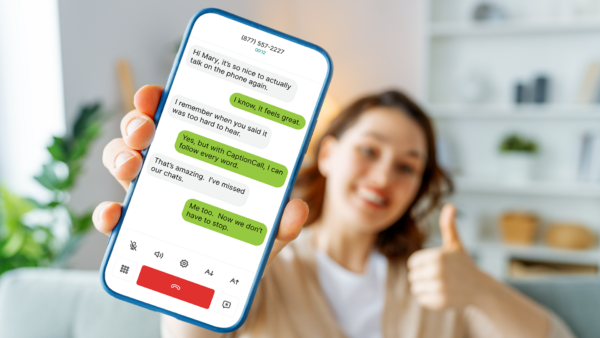
CaptionCall Mobile provides automatic, real-time captions for incoming and outgoing calls on compatible iPhone, iPad, and Android devices. Calls connect directly between the two people, and captions are generated without a third person listening.Key features
- Automatic real-time captions
- Incoming and outgoing captioned calls
- Captioned voicemail
- Saved call captions
- Adjustable text and display settings
- Compatibility with Bluetooth hearing aids, AirPods, and headphones
- Call-forwarding and caller-ID options
- Access to customer support
Why choose CaptionCall Mobile?
CaptionCall Mobile focuses on one primary job: making phone conversations easier to follow. It may be a strong fit if you want automatic call captions without navigating features you do not need. CaptionCall can also provide home phone captioning if a traditional phone becomes more comfortable. Eligible users can get both from one company rather than finding a different provider.InnoCaption
InnoCaption provides phone call captions on compatible iPhone and Android devices. Its main difference is that you can choose between automatic speech-to-text captions and live stenographer captions. Users can switch captioning methods before or during a call.Key features1
- Automated or live-stenographer captions
- Incoming and outgoing captioned calls
- Text-to-speech
- Captioned voicemail
- Saved transcripts
- One Number call forwarding
- Browser caption viewing through InnoCaption Web2
Rylo (formerly Nagish)
Rylo is the new name for the service previously known as Nagish.4 Older app references and search results may still use the Nagish name. Rylo uses AI-powered speech recognition to provide captions for incoming and outgoing phone calls. It also offers accessibility tools for communication beyond phone calls.Key features3
- AI-powered call captions
- Text-to-speech
- Captioned voicemail
- Saved transcripts
- Support for more than 50 languages
- Hearing-aid and Bluetooth compatibility
- Adjustable caption appearance
The CaptionCall difference: One provider for home and mobile
CaptionCall Mobile is not limited to a standalone app experience. Eligible users can choose:- CaptionCall Mobile for calls on the go
- A large-screen CaptionCall phone for calls at home
- Both options for greater flexibility
- Phone delivery
- Professional installation
- Personalized training
- Help making a first captioned call
- Time for questions

